

_1791809572887.webp&w=3840&q=75)
Before working with a new supplier, processing an invoice, or claiming Input Tax Credit (ITC), it is important to verify the business's GST registration.
The good news? You can check whether a GST number is active online using the official GST portal. You generally do not need to log in to search publicly available taxpayer details.
In this guide, we explain how to check GST is active or not, how to verify a GST Identification Number (GSTIN), what different registration statuses mean, and what to do if a GST number appears suspended or cancelled.
Quick Answer
Visit www.gst.gov.in, open the Search Taxpayer facility, enter the GSTIN, complete any requested verification, and review the registration status displayed in the results.
Steps to Check GST Is Active or Not Online
Search for the GSTIN on the official GST portal and check the registration status returned for that taxpayer. Follow the steps below to verify the number.
Step 1: Visit the official GST portal
Open the official Goods and Services Tax website: https://www.gst.gov.in/
Always use the government portal as your primary source when verifying GST registration. Third-party search tools can be useful, but their information should not replace an official status check.
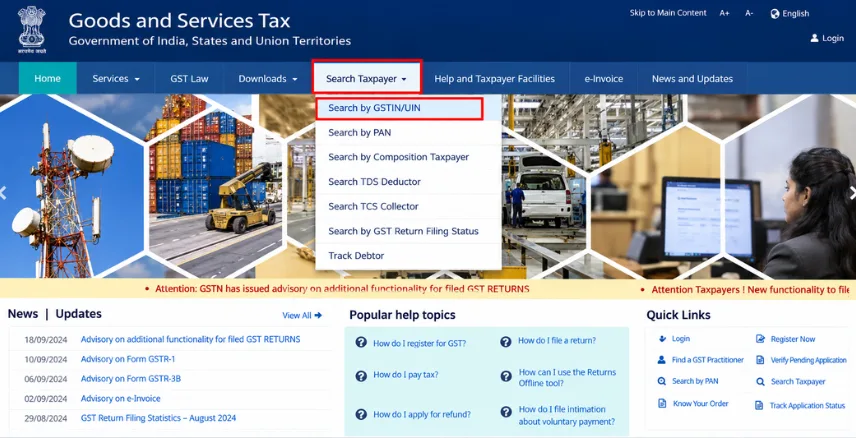
Step 2: Open Search Taxpayer
Locate the Search Taxpayer facility on the GST portal. Choose the option to search using a GSTIN or UIN.
The interface or menu labels may change over time, so follow the options currently displayed on the official website.
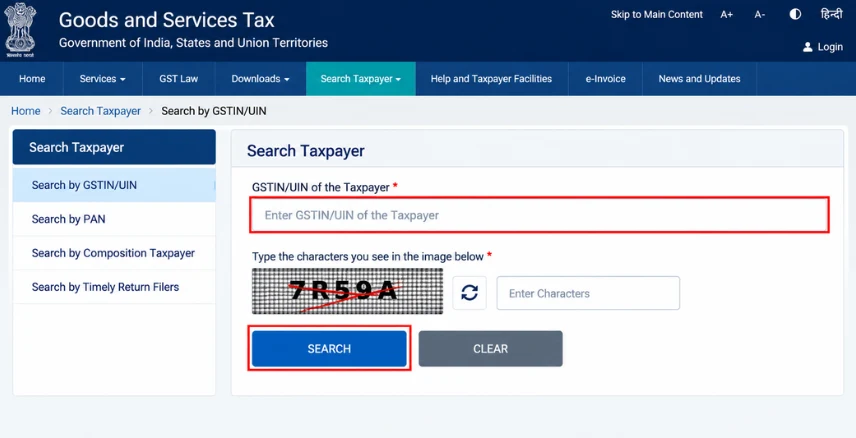
Step 3: Enter the GSTIN
Enter the complete 15-character GST Identification Number of the business you want to verify.
Check the number carefully before submitting it. A typing error can lead to an unsuccessful search or confusion with another taxpayer.
Step 4: Submit the search
Complete any CAPTCHA or verification requested by the portal, then submit your search.
Step 5: Check the Registration Status
Review the taxpayer details returned by the portal. Look for the registration status and compare the legal name, trade name, and other available information with the business documents.
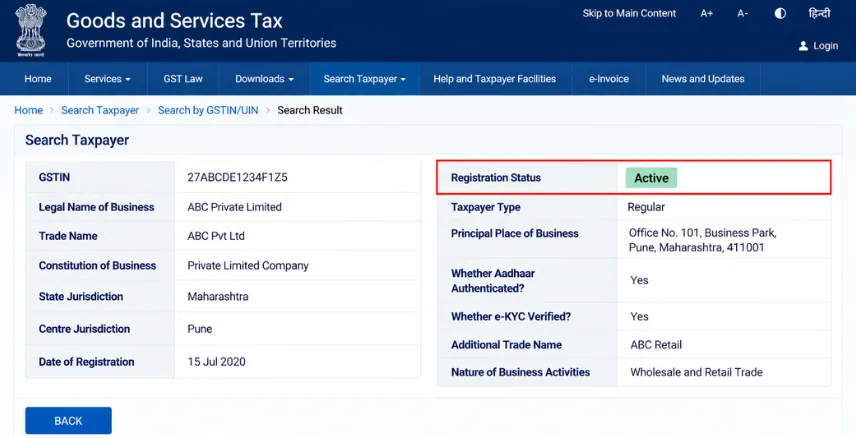
How to Check GST Number Status and Registration Details
A GSTIN search can help you verify whether the number belongs to the business you intend to deal with. Depending on the information available, the result may include the legal name, trade name, registration date, business constitution, principal place of business, and registration status.
Here is what to review:
|
Detail |
Why it matters |
|
GSTIN |
Confirms which registration you searched |
|
Legal name |
Helps identify the registered taxpayer |
|
Trade name |
Helps match the business's operating name |
|
Registration date |
Provides context for the registration |
|
Registration status |
Indicates the status displayed by the portal |
|
Business address |
Helps cross-check the taxpayer's details |
Do not assume that an active GSTIN means every return has been filed. Registration status and return-filing compliance are separate checks.
How to Check If a GST Number Is Valid
A GSTIN contains 15 alphanumeric characters. Its general structure includes a state code, the taxpayer's PAN, an entity code, a character that is usually Z, and a check code.
However, a number that looks structurally correct is not necessarily an active registration.
To verify a GST number:
- Confirm that all 15 characters have been entered correctly.
- Search the number using the official GST portal.
- Compare the legal name and available business details.
- Check the registration status and relevant dates.
- Resolve discrepancies before relying on the number for a business transaction.
This process is particularly useful when verifying a supplier's GSTIN before processing an invoice.
What Do Active, Suspended and Cancelled GST Statuses Mean?
Active indicates an active registration, suspended indicates a suspension, and cancelled indicates cancellation. Review the effective dates and relevant records before deciding how to proceed.
|
GST status |
What it means |
Recommended next step |
|
Active |
Registration is active according to the displayed record |
Verify the taxpayer details and applicable compliance requirements |
|
Suspended |
Registration is suspended |
Review relevant notices, reasons and effective dates |
|
Cancelled |
Registration has been cancelled |
Check the cancellation date and applicable GST rules |
|
No matching record |
The search did not return a matching record |
Recheck the GSTIN and verify it against reliable documents |
If the GSTIN is suspended or cancelled, do not treat it as an ordinary active registration. The effective date matters, especially when checking older invoices. If the status appears incorrect or unclear, review the taxpayer's records and seek professional advice where necessary.
How to Check the GST Number of a Company
Follow the same GSTIN verification process used for an individual business.
If you do not know the GST number, start with the company's invoices, registration certificate, or reliable business records. Depending on the available search facilities, PAN-related searches may also help identify associated registrations. Be careful when companies have similar names. A matching trade name alone does not establish that you have found the correct legal entity.
For businesses operating across multiple states, verify the GSTIN associated with the relevant state registration and transaction.
What to Do If Your GST Number Is Inactive
Confirm the displayed status, check the effective date and review any relevant GST notices. The appropriate action depends on whether the number is suspended, cancelled, or simply entered incorrectly.
If the GSTIN shows Suspended
Review the registration details and any notices available in your GST account. Identify the reason for suspension and follow the applicable procedure to resolve it.
If the GSTIN shows Cancelled
Check the cancellation order and effective date. Whether revocation or another remedy is available depends on the circumstances and applicable GST provisions.
If the GSTIN cannot be found
Recheck the 15-character number, compare it with the registration certificate, and try the search again.
Avoid assuming that every inactive registration can be restored through the same procedure. The correct next step depends on the reason and current registration status.
Why Is GSTIN Verification Important for Businesses?
GSTIN verification helps businesses identify registration discrepancies, maintain accurate invoices, review supplier details, and support their wider GST compliance processes.
- Accurate invoicing: Checking a supplier's GSTIN helps identify incorrect registration numbers or mismatched business details before an invoice is processed.
- Better ITC review: GSTIN verification is one part of reviewing an input tax credit claim. Businesses must also satisfy the applicable ITC conditions under GST law.
- Reliable GST returns: Incorrect GSTINs can create discrepancies in sales records, purchase records, GSTR-1 reporting, and reconciliation.
- Stronger vendor checks: Verifying registration details during supplier onboarding helps businesses maintain more reliable accounting and compliance records.
For businesses managing many invoices, a consistent verification process can help identify discrepancies earlier and reduce avoidable rework.
Need Help With GST Compliance?
Checking a GST number is only one part of managing GST obligations. Businesses may also need assistance with registration, return filing, invoice reconciliation, ITC review, and ongoing compliance. Paytaxs provides GST-related services to help businesses manage these requirements.
Explore Paytaxs GST Services to learn more about available support. Keep your GST records accurate, verify taxpayer details, and address registration discrepancies before they create bigger compliance problems.
Ready to Keep Your GST Compliant?
Get expert support with GST registration, return filing, and compliance.
Conclusion
Knowing how to check if GST is active or not helps you verify business registrations, maintain accurate invoices, and avoid unnecessary GST compliance issues. Always use the official GST portal to confirm GSTIN status and cross-check taxpayer details before proceeding with business transactions.
Need help managing your GST compliance? Explore Paytaxs GST Services for support with GST registration, return filing, and other GST-related requirements.
Ready to simplify GST compliance? Talk to our GST experts today!
Note: This guide is for information purposes only. The views expressed in this guide are personal and do not constitute the views of Paytaxs. Paytaxs or the author will not be responsible for any direct or indirect loss incurred by the reader for taking any decision based on the information or the contents. It is advisable to consult either a CA, CS, CPA or a professional tax expert from the Paytaxs team, as they are familiar with the current regulations and help you make accurate decisions and maintain accuracy throughout the whole process.

Shubham Jain is the Founder of SaveTaxs and has extensive experience in Indian and NRI taxation. He advises individuals, NRIs, and businesses on tax filing, tax planning, capital gains, DTAA benefits, fund repatriation, and compliance matters. He regularly writes about taxation and related financial topics. His focus is on making complex tax concepts easy to understand. Through his articles, he helps taxpayers stay informed, avoid common mistakes, and stay compliant with Indian tax laws. See Full Bio

Want to read more? Explore Blogs