


GST Reconciliation & Input Tax Credit
All You Need to Know About GST ReconciliationAll You Need to Know About GST Reconciliation
Written by Shubham Jain

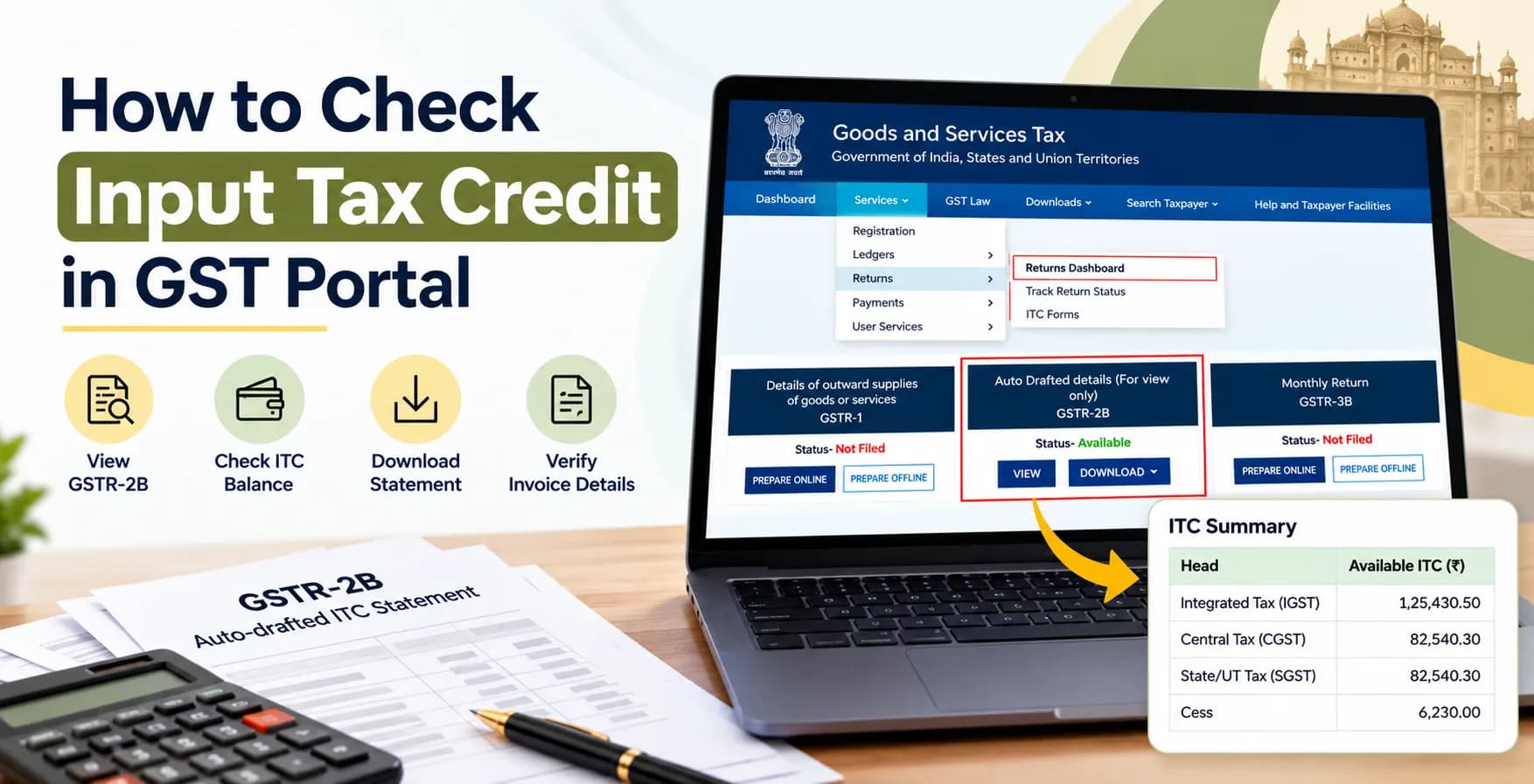
Have you received GST invoices from your suppliers but are unsure whether the tax credit is reflected in your account? The GST portal allows registered taxpayers to view their purchase-related ITC information through GSTR-2B and check their available credit balance through the Electronic Credit Ledger.
If you want to understand how to check input tax credit in GST portal, this guide explains the process step by step, including GSTR-2B, GSTR-3B, invoice verification, and ITC reconciliation.
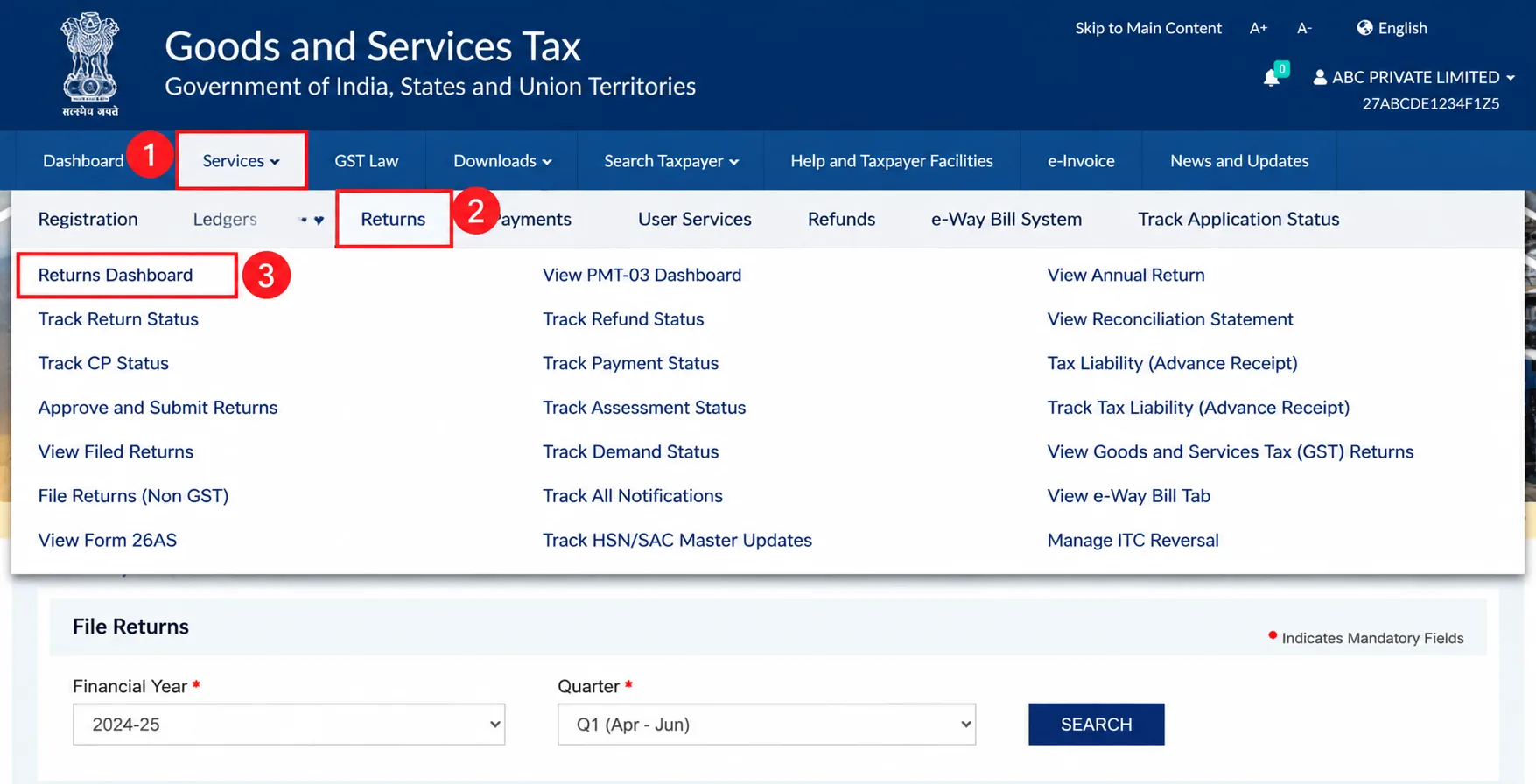
Log in to www.gst.gov.in, go to Services → Returns → Returns Dashboard, select the financial year and return period, and open the GSTR-2B tile. Review the available and unavailable ITC details and compare them with your purchase records.
Input tax credit under GST is tax paid on eligible business purchases that a registered taxpayer can claim against their output tax liability, subject to GST law.
For example, a registered business purchases office equipment for ₹50,000 plus 18% GST. If the purchase qualifies for ITC and meets all legal conditions, the business may claim the eligible GST amount as credit.
Understanding what is input tax credit in gst helps businesses avoid treating every GST amount on a purchase invoice as automatically claimable.
Follow these steps to view your ITC statement online.
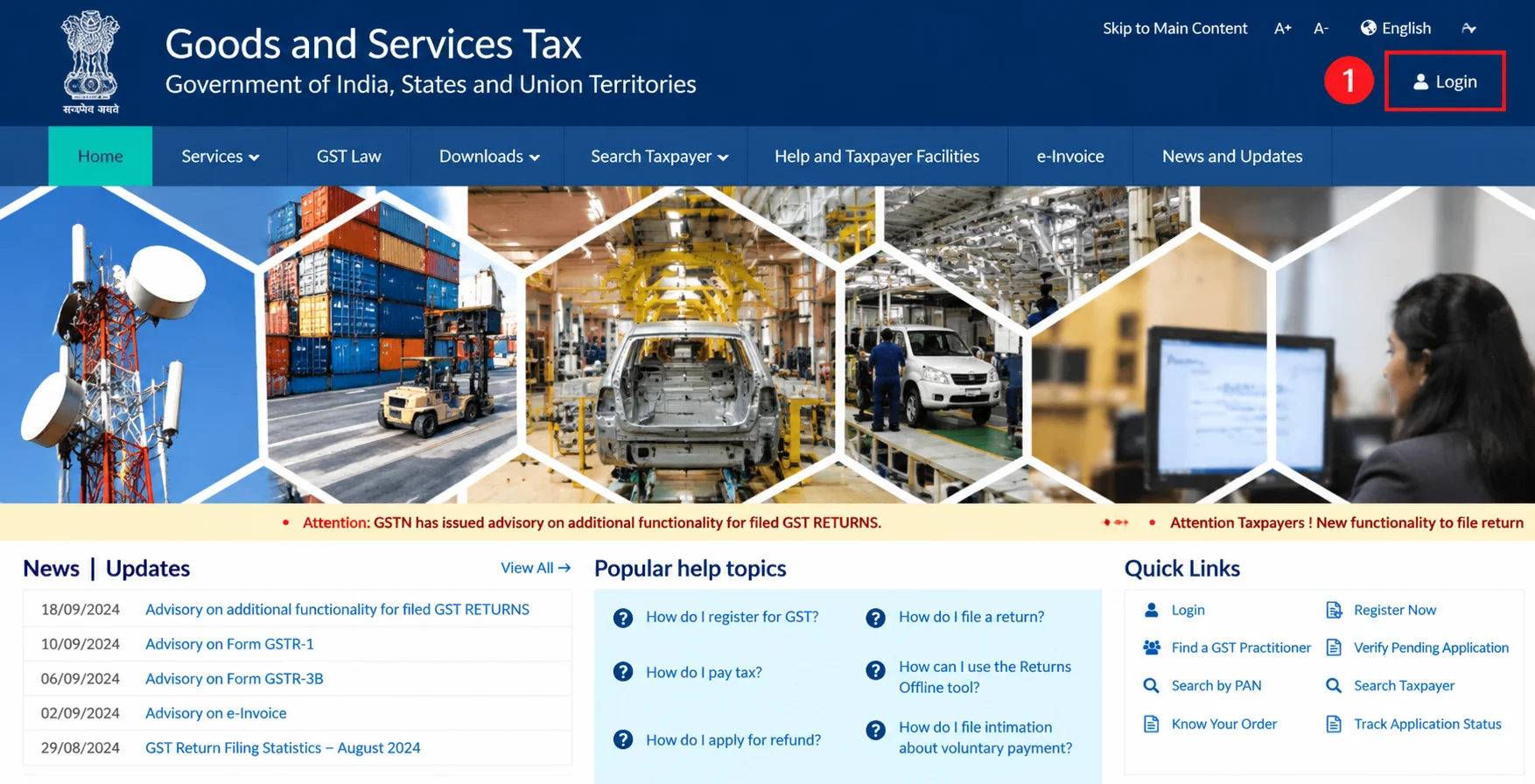
Visit the official GST portal and click Login.
Enter your GSTIN or username, password, and the requested verification details.
After logging in:
This section provides access to your return-related information.
Choose the relevant financial year and return filing period. Click Search to display the available return tiles.
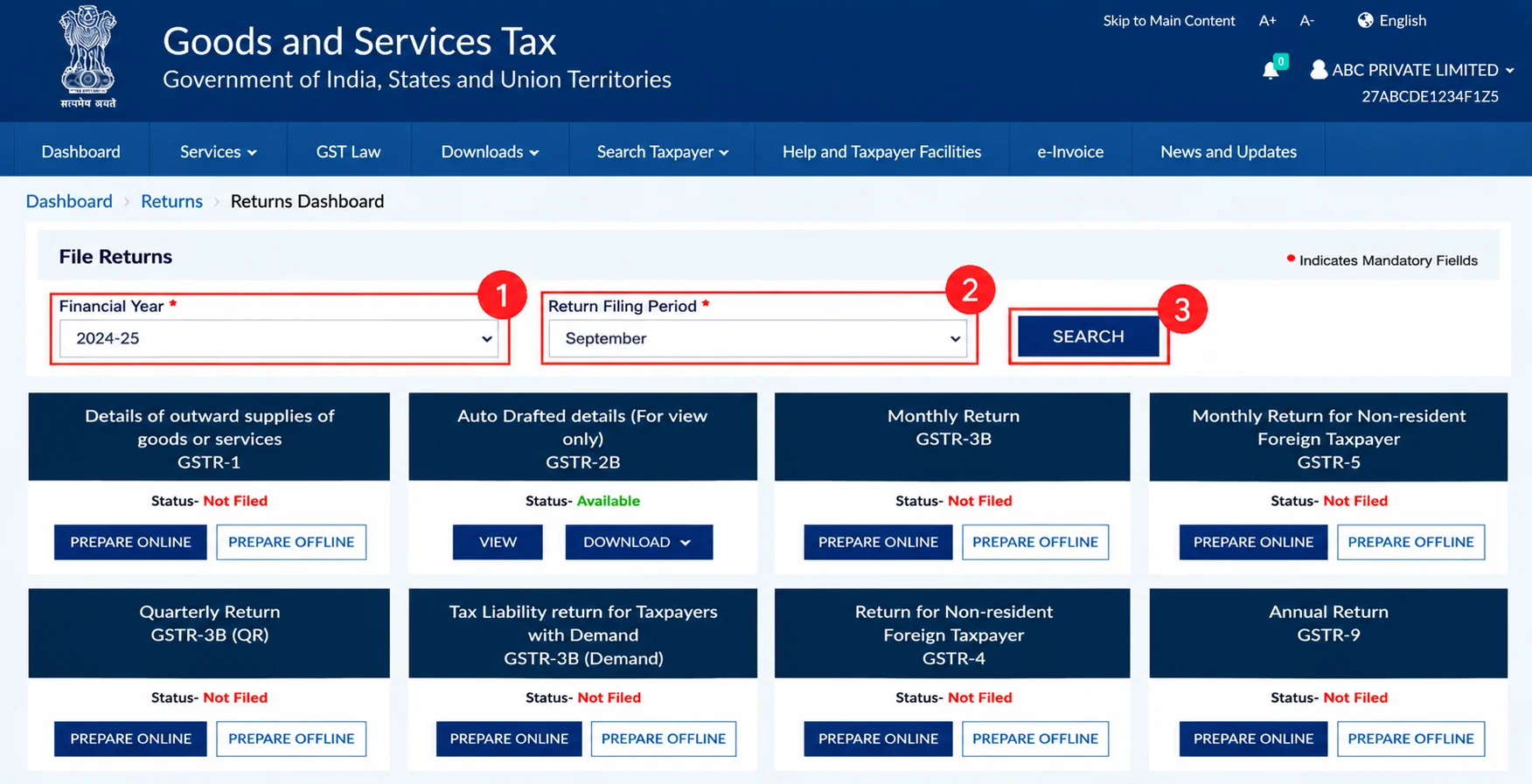
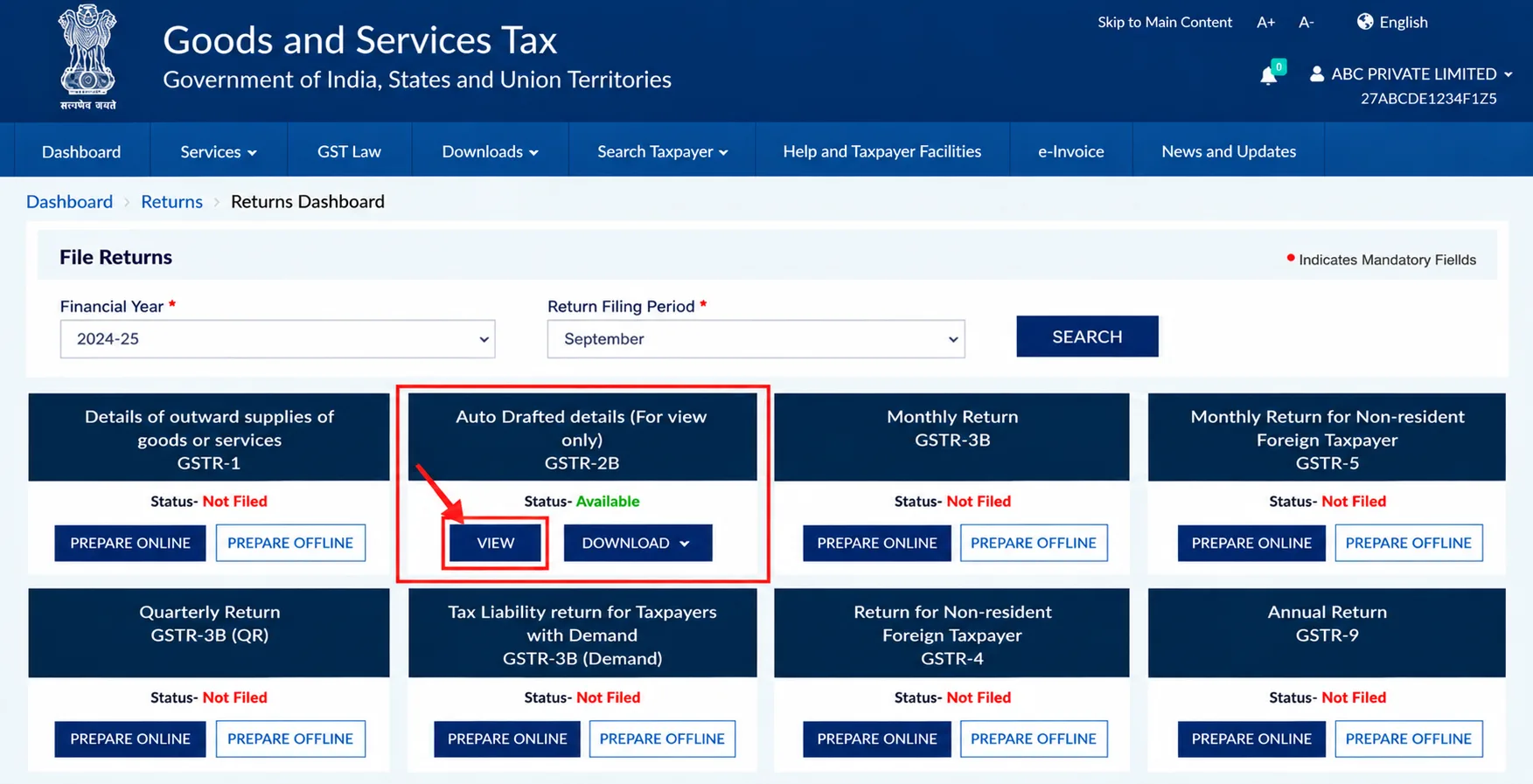
Locate the GSTR-2B – Auto-drafted ITC Statement tile. Open it to view the ITC information reported against your GSTIN.
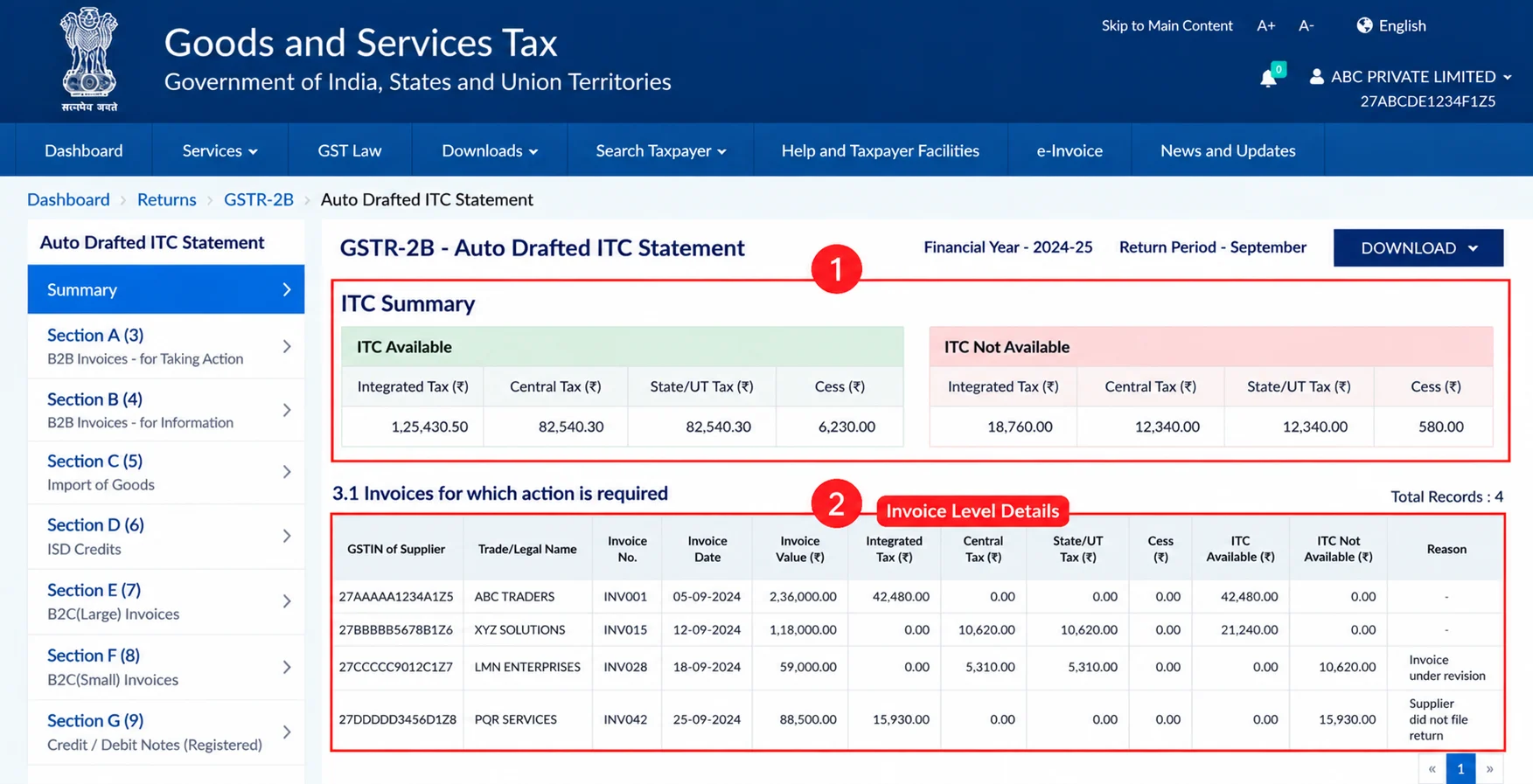
Check the available and unavailable credit summaries. Review the invoice-level details, including supplier information, invoice numbers, and tax amounts.
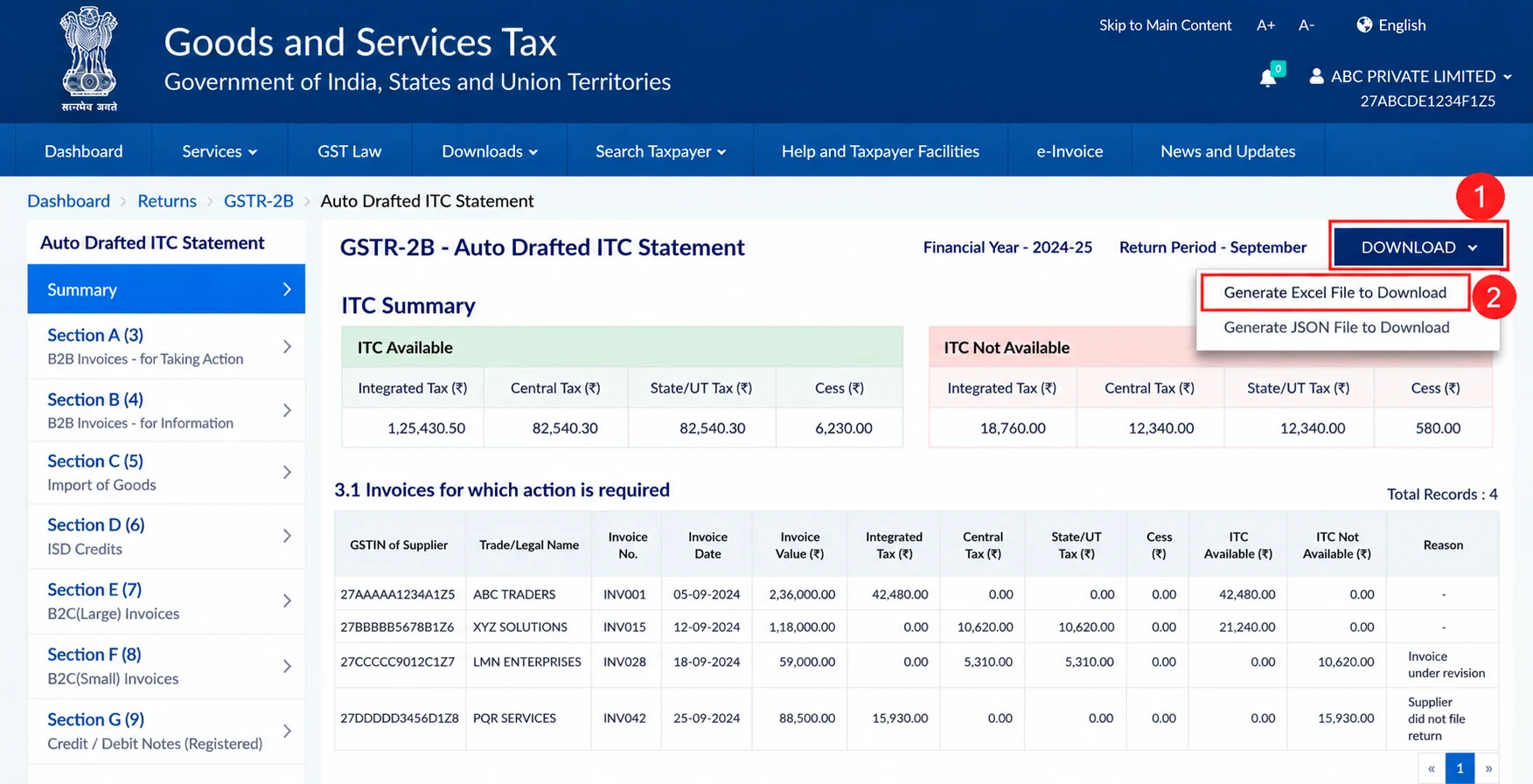
Download the available GSTR-2B statement in the supported format for your records and reconciliation.
You can also refer to the official GSTN GSTR-2B user guide and FAQs. Following these steps is the basic process for how to check input tax credit in gst portal without relying only on your accounting software.
GSTR-2B is an auto-drafted, read-only ITC statement generated using information reported by suppliers, input service distributors, and relevant import data. It helps taxpayers understand the credit reported against their purchases.
The statement contains two important summaries:
Understanding input tax credit in GST means checking these details against your own purchase register and the applicable eligibility conditions. Important: GSTR-2B is not permission to claim every amount shown in it. You must independently verify eligibility under GST law.
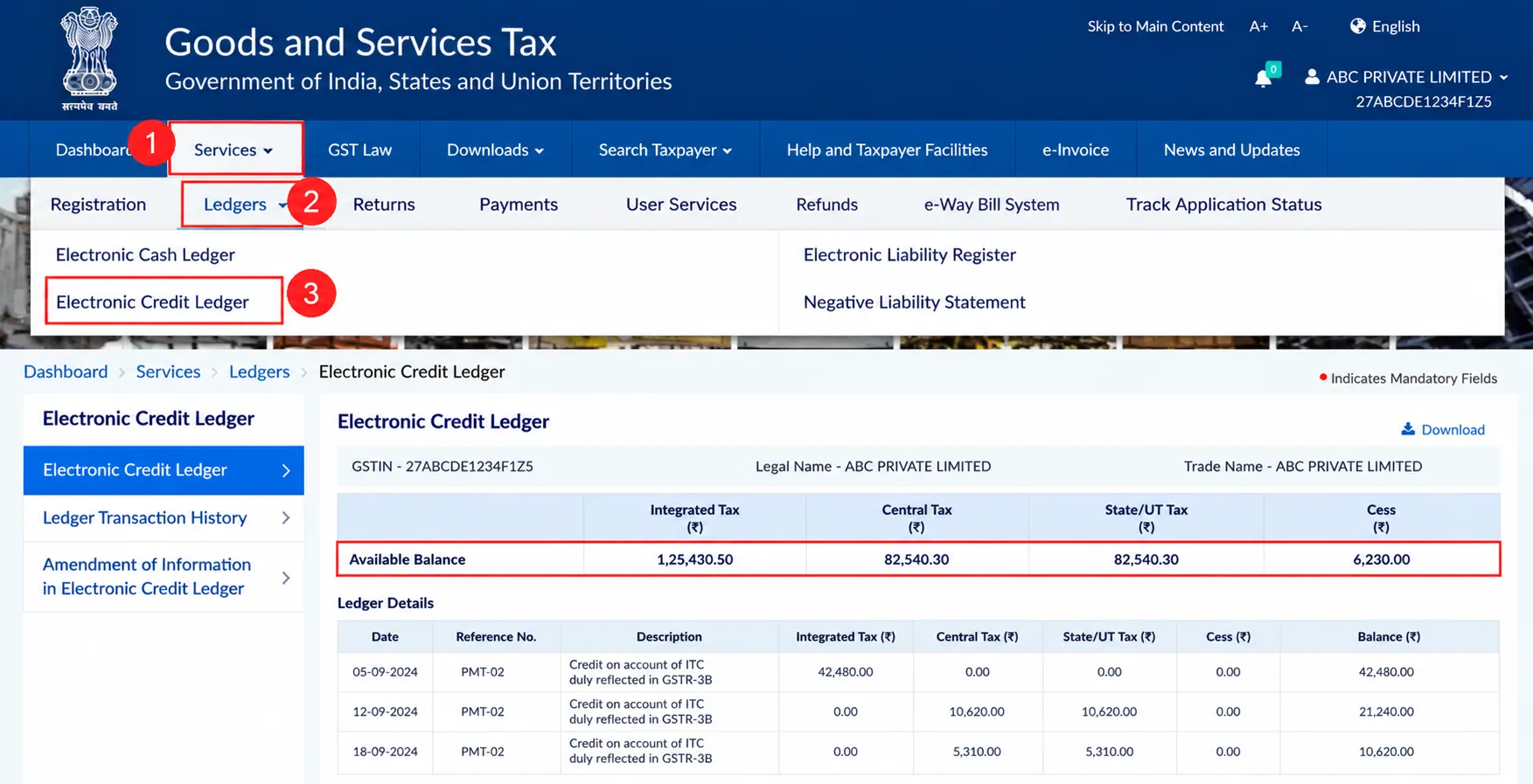
GSTR-2B and the Electronic Credit Ledger serve different purposes. GSTR-2B shows purchase-related ITC information, while the Electronic Credit Ledger reflects the credit available in your GST account.
To view the ledger:
The ledger is maintained in FORM GST PMT-02 under Rule 86 of the CGST Rules. Read the official Electronic Credit Ledger provisions for more information.
GSTR-3B is the summary return in which eligible ITC is reported and adjusted against applicable tax liabilities. Its ITC-related details are mainly reported in Table 4.
Businesses should compare the relevant GSTR-2B information with their books and the amounts reported in GSTR-3B. If you need to check GST return status, use the GST portal's Returns Dashboard to review the filing status of the relevant return.
Not every business purchase qualifies for ITC. A registered taxpayer must satisfy the applicable conditions before claiming credit.
|
Eligible ITC examples |
Potentially ineligible ITC examples |
|
Qualifying business purchases |
Personal-use purchases |
|
Eligible office equipment |
Certain motor vehicle expenses covered by restrictions |
|
Eligible business services |
Certain food and beverage expenses covered by restrictions |
|
Qualifying raw materials |
Goods or services used for exempt or non-business purposes, as applicable |
The distinction between eligible and ineligible input tax credit is important because claiming restricted credit can result in tax demands, interest, or other consequences.
For detailed conditions, refer to Section 17 of the CGST Act.
Businesses should keep the following requirements in mind before claiming ITC:
These GST input credit rules are important for avoiding incorrect claims and maintaining accurate records. The buyer should also verify supplier information. If you need to find gst no details, use the GST portal's Search Taxpayer facility. You can use the same facility to check gst details, including the registration status and registered business name.
If a supplier's GSTIN is unclear, knowing how to check GST no information can help you verify the registration before relying on the invoice.
Sometimes, an invoice may appear in your purchase register but not in GSTR-2B.
Common reasons include:
If you cannot find GST no information for a supplier, verify the GSTIN using the official portal before following up about the missing invoice. Also, check gst details carefully to identify differences in the supplier's registration information and invoice particulars.
For more help with reconciliation, read the Paytaxs GST reconciliation guide.
If your purchase register and GSTR-2B do not match, follow these steps:
Do not claim ITC merely because an invoice appears in your books. Verify the applicable conditions first.
Ensure your GST compliance with Paytaxs. Verify your GSTR-2B, reconcile purchase invoices, and identify eligible input tax credits.
Checking ITC regularly helps businesses identify missing invoices, verify eligible credits and reduce reconciliation errors. Review GSTR-2B, compare it with your purchase records and check the Electronic Credit Ledger before making tax adjustments.
Need help with ITC reconciliation or GST compliance? Explore Paytaxs GST Services and get support for your business.
Disclaimer: This article is for educational purposes only. ITC eligibility depends on the applicable provisions of the CGST Act and Rules, notifications and facts of each transaction. Consult a qualified GST professional for transaction-specific advice.
Note: This guide is for information purposes only. The views expressed in this guide are personal and do not constitute the views of Paytaxs. Paytaxs or the author will not be responsible for any direct or indirect loss incurred by the reader for taking any decision based on the information or the contents. It is advisable to consult either a CA, CS, CPA or a professional tax expert from the Paytaxs team, as they are familiar with the current regulations and help you make accurate decisions and maintain accuracy throughout the whole process.
Hatim Dudhiyawala is a Certified Public Accountant (CPA) with Paytaxs and specializes in Indian and NRI taxation, including GST. He advises individuals, NRIs, and businesses on income tax filing, capital gains taxation, DTAA benefits, fund repatriation, GST compliance, and tax compliance. With experience in cross-border tax matters, Hatim helps taxpayers understand complex regulations and make informed decisions. Through his articles on GST updates, notifications, and compliance, he shares practical insights to help readers stay compliant and manage their tax obligations with confidence. See Full Bio
Want to read more? Explore Blogs