

GST Registration & Basics
How to Download GST Certificate from GST Portal 2026How to Download GST Certificate from GST Portal 2026
Written by Shubham Jain

If you run a business, receive GST invoices, or work with suppliers, knowing how to check gst number details can help you avoid mistakes. A GST number identifies a business registered under the Goods and Services Tax system in India.
You may need to find your own GST number, verify a supplier’s GSTIN, or check whether a business’s registration is active. You can perform a basic verification using the official GST Portal.
This guide explains how to check GST details, find your own GSTIN, and verify another taxpayer’s registration step by step.
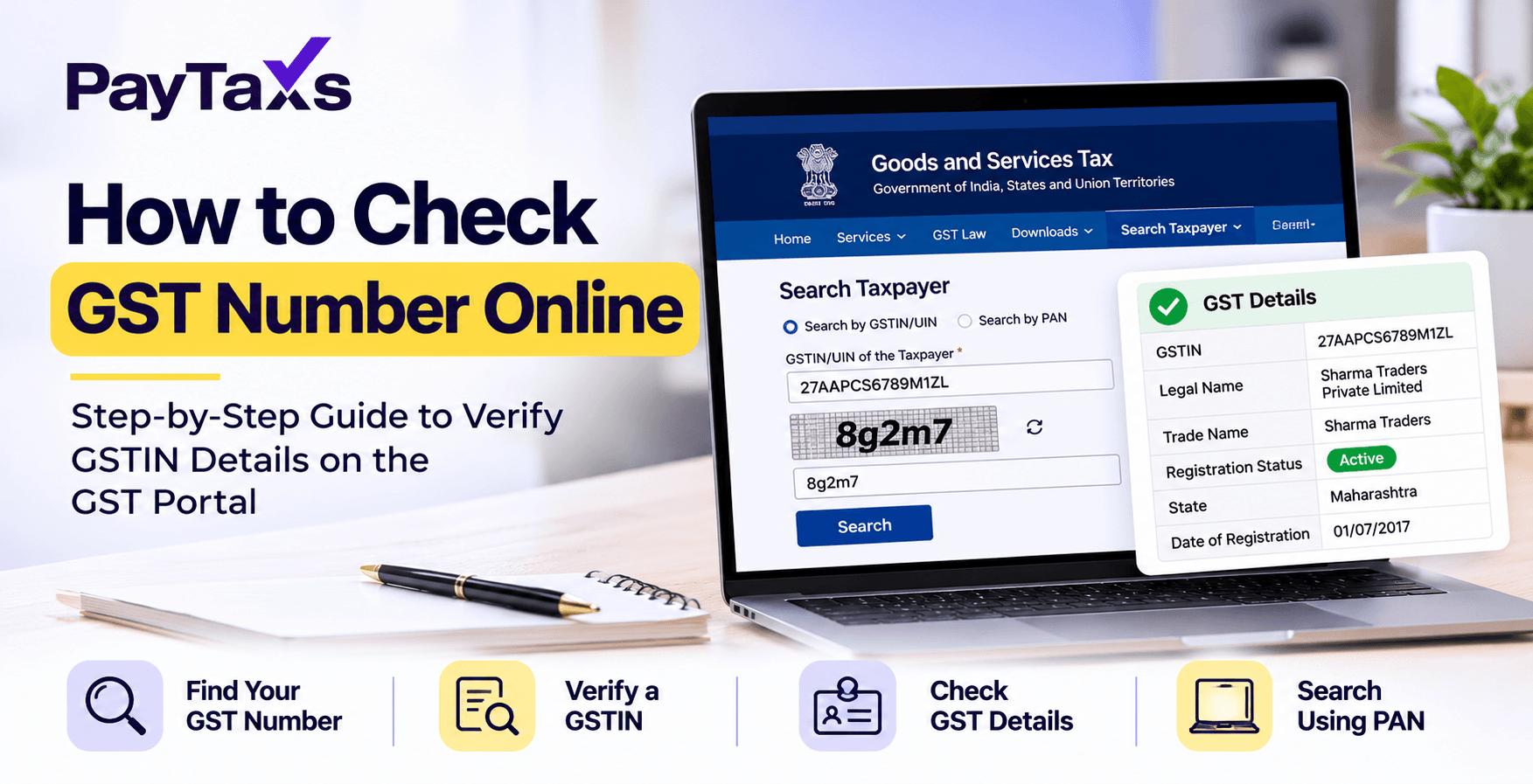
To check a GST number, visit gst.gov.in, select Search Taxpayer → Search by GSTIN/UIN, enter the GSTIN, complete verification if prompted, and click Search.
A GST number is commonly called a GSTIN, or Goods and Services Tax Identification Number. It is a unique 15-character identification number assigned to a business registered under GST.
A GSTIN generally contains:
For example, a GSTIN beginning with 08 indicates registration in Rajasthan. However, checking the format alone does not confirm that a GST registration is active. You should perform an official GST number check.
Follow these steps to check a supplier’s, customer’s, or business’s GSTIN.
Open www.gst.gov.in.
Use the official government portal when checking GST registration information.
On the homepage, open Search Taxpayer.
This facility allows users to search for taxpayer information using a GSTIN/UIN or PAN. Basic taxpayer verification is available without logging in.
GST Tutorial+1
Select Search by GSTIN/UIN.
Enter the 15-character GST number exactly as it appears on the invoice, registration certificate, or business document.
Enter the verification code shown on the page, if prompted, and click Search.
Read More: E-Invoicing for RCM From 1 January 2027
The portal will display the available taxpayer information. Compare the details with the invoice or business documents you received.
This is the standard process for an online GST number check using the official portal.
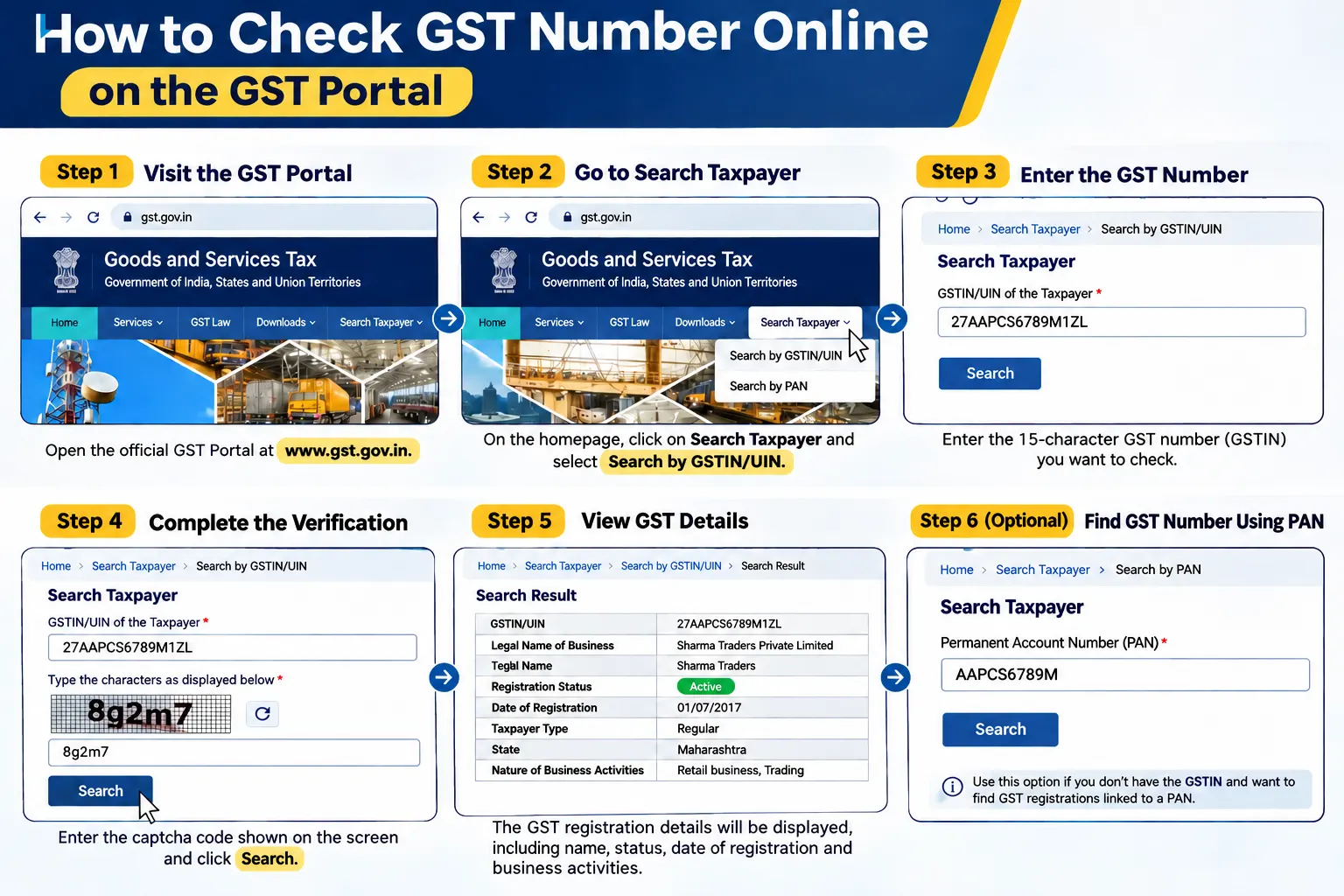
A GST number lookup can help you review available registration details such as:
|
Detail |
Why it matters |
|
Legal name of business |
Helps identify the registered taxpayer |
|
Trade name |
Helps compare the registered business with its shop or brand name |
|
GSTIN/UIN status |
Shows the registration status displayed by the portal |
|
Date of registration |
Helps confirm when the registration began |
|
Taxpayer type |
Shows the taxpayer category |
|
State and jurisdiction |
Helps identify the registration’s state and tax jurisdiction |
|
Nature of business activities |
Provides information about registered activities |
|
Return filing information |
May help you review available filing details |
The GST Portal’s taxpayer search documentation lists details such as legal name, trade name, jurisdiction, registration date, taxpayer type, GSTIN/UIN status, business activities, and return filing information.
If you’re wondering, “How do I find my GST number?”, try these methods.
Your GSTIN is mentioned on your GST registration certificate. Access or download the certificate through your GST account.
If your business has issued GST invoices, your GSTIN should generally be printed on them. Check a recent invoice issued by your business.
Log in to your GST Portal account and review your registration details.
If you know your business PAN but cannot remember your GSTIN, use the GST Portal’s Search by PAN option to look for GST registrations linked to that PAN.
GST Tutorial+1
These methods can help you find my gst number without relying on an unverified source.
Sometimes you may not have the GSTIN but know the business’s PAN.
This option can be useful when a business operates in more than one state and has multiple GST registrations. The GST Portal’s registration guidance confirms that GSTINs and other registration IDs can be mapped to the same PAN.
Before accepting an invoice or working with a new supplier, take a moment to verify gst number details.
Check the following:
If the details do not match, ask the supplier to clarify or provide corrected documents before relying on the invoice for your records.
If your GST number search does not return a result, do not immediately assume the GSTIN is fake.
Try these checks:
If the issue continues, seek clarification from the business or professional GST assistance before using the number for compliance purposes.
A business’s legal name may differ from its shop name or brand name. Compare both details instead of relying on only one.
A number may look correctly formatted but still require verification through the GST Portal.
Do not stop after confirming that a GSTIN exists. Review the registration status shown in the search result.
Third-party tools may be convenient, but the official GST Portal should be your primary reference for GST registration verification.
Paytaxs can help you understand GST registration details, invoicing, returns, and other GST compliance requirements.
Knowing how to check GST number details can help business owners, customers, and taxpayers verify GST registrations and reduce avoidable errors. You can use the official GST Portal to search by GSTIN/UIN or PAN and review the available taxpayer information.
If you are checking a supplier’s GSTIN, compare the returned details with the invoice and business documents. If you need to know your GST number, check your registration certificate, previous invoices, or GST Portal account.
For important business transactions, verify the information through the official portal rather than relying only on the GSTIN’s format.
Note: This guide is for information purposes only. The views expressed in this guide are personal and do not constitute the views of Paytaxs. Paytaxs or the author will not be responsible for any direct or indirect loss incurred by the reader for taking any decision based on the information or the contents. It is advisable to consult either a CA, CS, CPA or a professional tax expert from the Paytaxs team, as they are familiar with the current regulations and help you make accurate decisions and maintain accuracy throughout the whole process.
Hatim Dudhiyawala is a Certified Public Accountant (CPA) with Paytaxs and specializes in Indian and NRI taxation, including GST. He advises individuals, NRIs, and businesses on income tax filing, capital gains taxation, DTAA benefits, fund repatriation, GST compliance, and tax compliance. With experience in cross-border tax matters, Hatim helps taxpayers understand complex regulations and make informed decisions. Through his articles on GST updates, notifications, and compliance, he shares practical insights to help readers stay compliant and manage their tax obligations with confidence. See Full Bio
Want to read more? Explore Blogs